Conol 1.4.0 — Your deck, more in the loop
Conol
- release-notes
In 1.3.0, your agents came to the deck on your desk. This release makes the deck more useful while an agent is working. It shows what the agent is doing right now, and it understands you the same way the Conol app does.
See what the agent is doing, right on the deck
Why. Until now, the deck showed a chat's messages and whether it was running. The messages showed what the agent had said, not what it was doing. In a long run, an agent can spend minutes on steps that write no reply: running a command, reading a note, searching the web. From the deck, you couldn't tell a busy step from a stuck one. To find out, you had to bring Conol back up, which is the trip the deck is meant to save.
How to use it.
- Update the Conol desktop app to 1.4.0 and OpenWalkieTalkie to 0.12.0 or later.
- Pick a chat on the deck. Below its latest messages, you'll see the agent's current step, worded the same way as in the Conol chat timeline (for example, "Running a command"), with a short preview such as the command itself.
- Each step shows its state: running, completed, failed or stopped. When the agent moves on to the next step, the row updates in place. If you stop the chat, or a step is cut off, the running indicator clears.
Tip
Conol's own speech recognition on the deck
Why. In 1.3.0, what you said on the deck was transcribed by your Mac's dictation. The Conol composer's microphone uses Conol's speech model, so the same sentence could come out differently depending on where you said it. Now the deck uses Conol's model too. Speaking to a chat from your desk gives the same result as speaking into the composer.
How to use it.
- Update the Conol desktop app to 1.4.0. Make sure you're signed in.
- On the deck, pick a chat or + New chat, hold to talk, speak, and release.
- While you hold, the deck shows a RECORDING waveform that follows your voice. Your words no longer appear live as you speak. The live words came from your Mac's dictation, and they aren't what Conol hears.
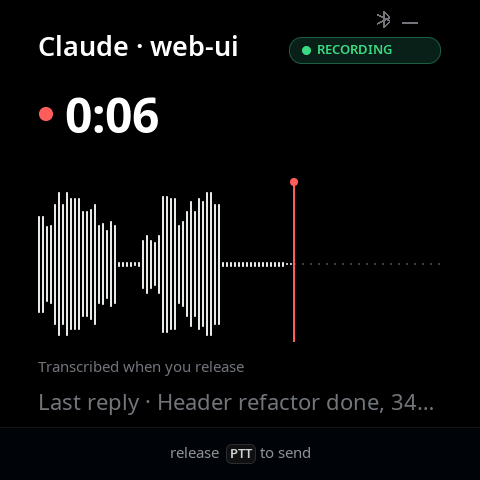
- When you release, Conol transcribes the recording. The text is sent as your message or answer, exactly as before.
If Conol can't transcribe a recording, for example because it's too long or Conol doesn't respond in time, the deck uses your Mac's transcript instead. Your message still goes through. Your Conol sign-in never leaves the desktop app: the deck hands over only the audio.
← Back to blog