Conol 1.0 — Thank you for getting us here
Conol
- release-notes
Conol is 1.0. The release itself is small: a new way to watch the agent work, and one sign-in fix. The number is the bigger change. When we launched in July, Conol was an idea with a working core: give an agent a real note workspace, let it run without you watching, and have it tell you when the job is done. Every release since then has filled in that idea, and today it is the product we set out to build. This post looks back at how it got here, then walks through what is new.
What Conol is at 1.0
Your notes are the agent's context. The agent lives inside a collaborative note workspace. It reads your notes instead of asking you to paste them, and its work lands back in them. It can change one table cell, one formula or one list item and leave the rest of the note exactly as it was. Long notes get a table of contents, and notes and chats open side by side in tabs.
It works while you don't. Hand it a task and close the tab. The agent runs on our servers and can schedule itself, with timers you can see and cancel from the composer. It breaks big jobs into live workflows and hands pieces to sub-agents. What it wants you to see lands in your inbox, where you can read each message in full before you act on it. When it needs a decision, a raised hand marks the chat so a question never looks like a chat that is still busy.
It reaches you where you already are. Talk to your agent on Telegram, WeChat, WhatsApp, Discord or Slack, including Slack channels your team shares. In a Slack channel it follows the whole conversation and speaks when you @-mention it. On Telegram, reply to any message and it picks up that thread. On every channel, it tells you when a turn fails instead of going quiet.
It connects to your tools. GitHub, Vercel, Cloudflare, Google Workspace, Outlook, Airtable, Figma, HubSpot, Jira, Linear, Zoom, Supabase and Attio are each a click away in Connectors & Secrets. You can also give it your own API keys without pasting them into a chat, and share them with your workspace. In its sandbox it runs real commands, and you watch the output stream in as it happens. It works on your private repositories and can hand coding work to Claude Code or Codex.
It makes things. Images, image edits, video, music and speech, alongside the writing and research.
You pick the model. The newest models from Anthropic, OpenAI, Z.ai, DeepSeek, Moonshot, Qwen and more, with presets from Flash to Ultra for when you don't want to choose. You can also set how hard a model thinks and switch models mid-chat.
It is everywhere you work. On the web in English, Japanese, Simplified Chinese and Traditional Chinese. On the Mac as a native app with as many windows as you want. On iPhone through TestFlight. You can stay signed in to several accounts in one browser, move around with ⌘K, and drive the sidebar from the keyboard.
None of this was on day one, and most of it came from you: bug reports in Discord, requests on Telegram, and the long threads that showed us where the agent got in the way. Thank you.
A calmer view of the agent at work
Why. As the agent took on bigger jobs, watching it got noisy. Every tool call had its own row with an uppercase badge, a row of dots marked progress, and the agent's thinking opened by default and pushed everything else down. A request that touched a dozen tools became a wall of badges, and the answer you came for sat somewhere underneath. You could not tell at a glance whether the agent was still working, waiting on you, or stuck.
The fix is to show less by default and all of it on request. Each stretch of work now reads like one line of plain English. The details are still there, one click away.
How to use it. There is nothing to switch on. Every chat, new and old, now works this way.
- While the agent works, each run of thinking, tool calls and sub-agent calls folds into a single status row. It shows the step running right now, such as a command or a web search. Between steps it shows the latest line of the agent's thinking. After a few seconds the row shows a timer, so you can tell a long step from a hung one. If the agent is waiting on an answer from you, the row says Needs your input.
- When it finishes, the row settles into a one-line summary of what happened, such as Listed workspaces, listed notes, read a note or Ran 3 commands, edited a note, and 2 more tools. The agent's reply follows directly underneath.
- Click the row to open a card that lists every step in order. Each step shows what it touched and a short result, like 2 workspaces or 1 note.
- Click a step to expand it where it is. A command shows its command line and output, a note edit shows the diff, a web search shows the results with their site icons, and a connector call shows the request and response. The agent's thinking sits in the same list, so you can read its reasoning next to what it did.
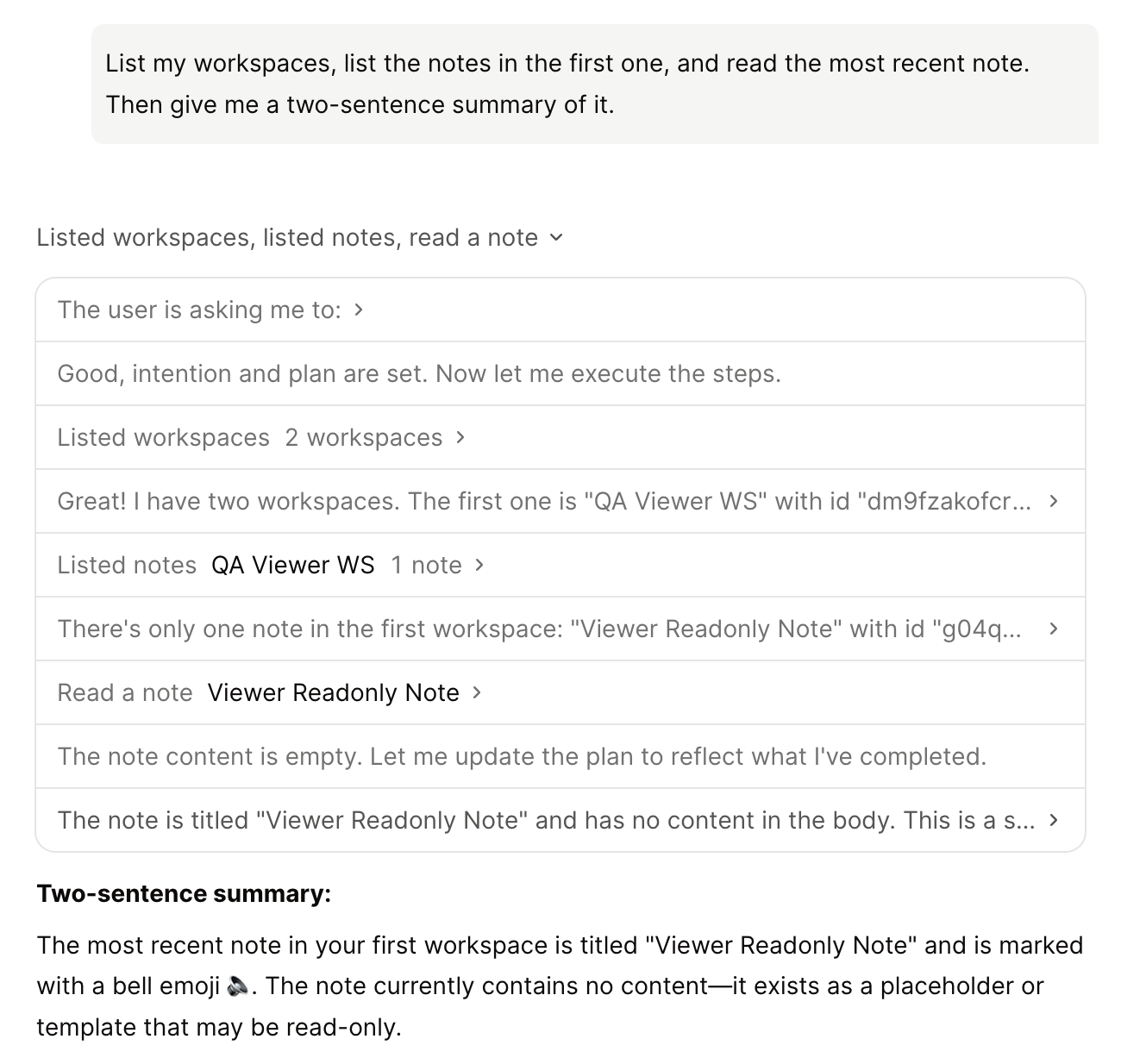
Failures are marked on the step they happened on. A command that exits with an error shows Failed, one that runs too long shows Timed out, and a step you stopped shows Stopped. A failed step no longer pulses as if it were still running, so a failure is easy to spot even in a long run.
Tip
Only one step card stays open per chat pane, so opening a new one closes the last. A card you open stays open while the agent keeps working, even as new steps arrive.
The new rows respect your system's reduced-motion and high-contrast settings, and every label is translated into all four app languages.
Fixes
- Mac app sign-in with several accounts. If you were signed in to more than one Conol account, signing in to the Mac app through your browser could finish successfully and still put you back on the sign-in page, every time you tried. The app was opening the first account in your list instead of the one you had just signed in to, and that account's session had expired. It now opens the account you just signed in to. The fix is on our servers, so there is no app update to install.
← Back to blog