Conol 0.58.0 — The agent raises its hand, and four new models
Conol
- release-notes
An agent that works while you do something else is only useful if you can tell the difference between "still working" and "waiting for me." This release makes that difference visible. It also adds four new models, re-points all four capability tiers at fresher ones, and moves the app onto the current release of its web framework.
You can see when the agent is waiting for you
Why. The agent can stop mid-task and ask you something — which of two files to edit, whether to deploy, which option you meant. Until now that pause looked exactly like work in progress: the chat kept its spinner, the tab kept its ordinary icon, and nothing told you anything had changed. If you had switched to another tab, closed the window, or simply looked away, the question sat there unanswered. People lost half an hour to a chat that had been ready for them the whole time, and the only way to find out was to open every running chat and check.
The root of it was that a paused agent and a busy agent are, internally, in the same state: the task is open, nothing has finished. Nothing in the product distinguished them, so nothing in the interface could either.
How to use it. There is nothing to turn on. When the agent asks you a question:
- A raised hand replaces the spinner on that chat's tab and next to it in the chat list, with the question itself on the line underneath, so you can see what is being asked without opening the chat.
- A notification lands in your inbox, titled with the chat and carrying the question. Click Answer to jump straight to it. If you use the desktop app and its window is not focused, that notification also arrives as a normal macOS notification.
- If the chat is open in another window or another browser tab, a toast appears there with an Open button. The window you are already looking at stays quiet, because the question is right in front of you.

All of it clears the moment you answer, dismiss the form, or stop the chat. A chat waiting on a question from one of its sub-agents shows the hand too, on the main chat, which is where the form appears.
One note on timers: a scheduled chat that wakes up and asks you something moves to the top of the list with the other chats that need you, rather than staying filed under Scheduled. It needs you now, not later.
GPT-6 Sol and GPT-6 Luna
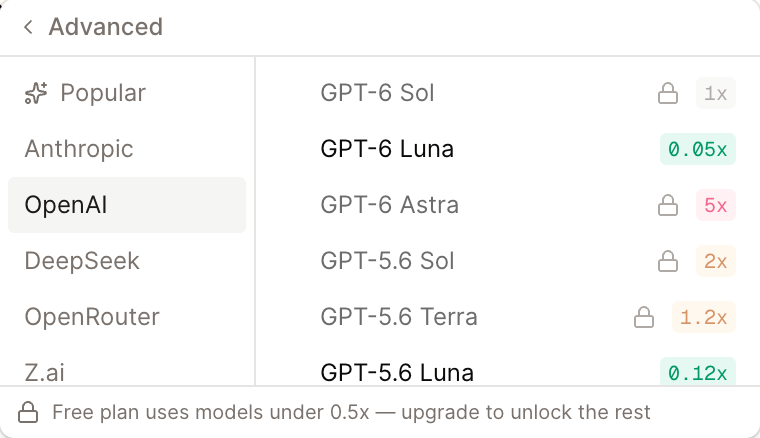
Why. OpenAI filled out its GPT-6 line this week with two models below GPT-6 Astra, at roughly half the price of the GPT-5.6 models they succeed. That is a real shift in what a given amount of money buys: Sol lands at the same price as our baseline model while being materially better than the generation before it, and Luna costs about a twentieth of that while still handling ordinary work. Both were verified against our own account before being added — listed and callable are different things, and we check the second.
How to use it. Open the model menu in the composer, go to Advanced → OpenAI, and pick either one.
- GPT-6 Sol is the all-rounder. It carries the same cost badge as Claude Sonnet 5, so if you are used to that as your default, Sol is a like-for-like swap to try.
- GPT-6 Luna is the inexpensive one, at 0.05× the baseline. It is available on the free plan, reads images, and holds a million tokens of context — a good pick for long documents you want summarised cheaply.
Both read images, both hold 1M tokens of context, and both support the full effort range, so you can raise Effort in the same menu when a question deserves more thought.
Claude Opus 5.5 and Claude Fable 5.1
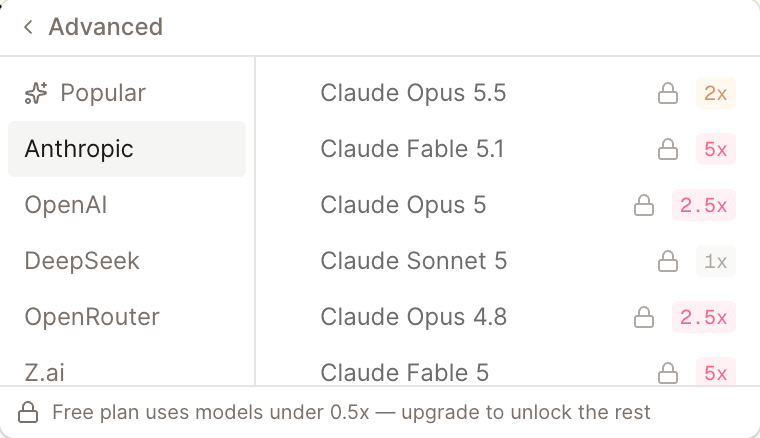
Why. Anthropic shipped two models since our last release, and one of them is unusual: Claude Opus 5.5 is both better than Claude Opus 5 and cheaper to run. A capability increase that arrives with a price cut is worth passing along immediately. Claude Fable 5.1 succeeds Fable 5 at the same price, as the most capable model we offer.
How to use it. Advanced → Anthropic, and they are the top two entries. Opus 5.5 shows a 2× cost badge sitting directly above Opus 5 at 2.5×, which is the whole story in one screenshot — there is little reason to keep reaching for the older one.
Both models think adaptively, which means they decide how long to spend on a problem rather than working to a fixed budget. You can still steer that with Effort in the model menu.
New models behind Flash, Moderate, Pro and Ultra
Why. Most people pick a capability tier rather than a specific model, and the point of a tier is that it always points at the best current option at that price. Four new models arrived in a week, so the tiers needed re-pointing.
How to use it. Nothing changes in how you choose — the same four tiers sit at the top of the model menu — but they now run on:
| Tier | Text | Images |
|---|---|---|
| Flash | GLM 5.3 Flash | GLM 5.3 Flash |
| Moderate | DeepSeek V4 Pro | Kimi K3 |
| Pro | GPT-6 Sol | GPT-6 Sol |
| Ultra | GPT-6 Astra | GPT-6 Astra |
There is a quieter improvement here. A tier has always had two slots: one model for text-only conversations and a second that takes over when you attach an image. Flash, Pro and Ultra now use the same model for both, so attaching an image no longer switches the model underneath a conversation in progress. Moderate still switches, because its text model is text-only and considerably cheaper for it.
Tip
A chat you started earlier on a tier keeps running its current model until the next time you switch tiers or attach an image. If you want a conversation on the new lineup right away, start a fresh chat.
Flash and Moderate remain usable on the free plan for text. Pro and Ultra need a subscription or purchased credits, as does Moderate once images enter the conversation.
Fixes
- A security update to the web framework — the app now runs on the current release of the framework it is built on, which includes a security fix in the way images are processed. Nothing about how the app looks or behaves changes, and you do not need to do anything.
← Back to blog