Conol 0.57.0 — A model that sees, and fairer prices
Conol
- release-notes
This release adds a fast, inexpensive model that can look at your images, passes along price cuts we found while re-checking every model against its provider, and clears a few rough edges in the Mac app and the agent.
DeepSeek V4 Flash Vision reads your images
Why. DeepSeek V4 Flash is one of the cheapest, fastest models in the menu, but it was text-only — attach a screenshot or a diagram and it couldn't see it. Plenty of everyday questions are about an image: "what's wrong with this chart," "read the text in this photo," "which of these two layouts is cleaner." Until now that meant reaching for a pricier model.
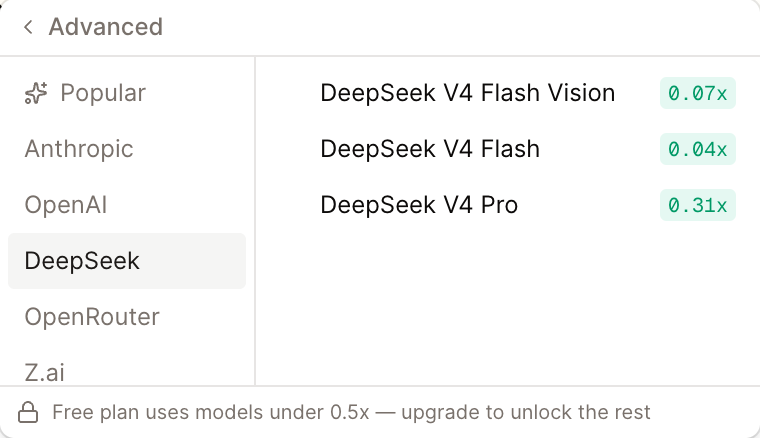
How to use it. Open the model menu in the chat composer, go to Advanced → DeepSeek, and pick DeepSeek V4 Flash Vision. Then attach an image with the image button (or paste one) and ask your question. It has the same text and agent abilities as DeepSeek V4 Flash, so you can keep using it for ordinary chats too — it just also has eyes now. At roughly 0.07× the baseline model's price, it's one of the least expensive ways to put an image in front of an agent.
Several models now cost less
Why. Model providers change their prices often, and the rate you pay should follow. We went through every model in the menu and compared what we charge against what the provider currently charges. Where their price had dropped, ours should too — there's no reason for you to keep paying yesterday's rate.
How to use it. Nothing to do. GLM 5.3, Kimi K3 and the GPT-5.6 models (Terra and Luna especially) now cost noticeably less per message, and the cost badge next to each model in the menu already shows the new multiplier. A couple of the drops are large — GPT-5.6 Luna in particular fell to a fraction of its old rate — so if you'd shelved a model as too expensive, it's worth another look.
Fixes
- DeepSeek V4 Pro answers again — a price change on the provider's side left no server matching the rate we bill, so requests to this model quietly went nowhere and you got no reply. It's back to normal.
- You can always drag the Mac window — with a lot of tabs open, the top bar filled up completely and left nowhere to grab the window. There's now a small reserved strip at the end of the tabs, the way Chrome keeps one, so the window stays draggable no matter how many tabs you have.
- The agent recovers from a failed note edit — when the agent's change to a note didn't apply, it used to get a blank failure and sometimes give up or retry the same thing unchanged. It now sees exactly what went wrong and corrects the edit, so its changes to your notes land more reliably.
← Back to blog