Conol 0.55.0 — Your notes, exactly as the agent left them
Conol
- release-notes
This release is about trust in the note editor. A user showed us a session where the agent edited their note, reported success, and the note quietly went back to its old state a minute later. We traced it to the root, fixed the whole class, and while we were in there made agent edits both more likely to land and gentler on everything around them. On top of that: OpenAI's GPT-6 Astra is in the picker, timers can be cancelled from anywhere, and GPT-5.6 Sol got cheaper.
GPT-6 Astra joins the model picker
Why. OpenAI's new flagship arrived at the end of August, and it belongs in the same top tier as Claude Fable 5: a million tokens of context, image understanding, and a reasoning dial that goes further than anything else in the picker.
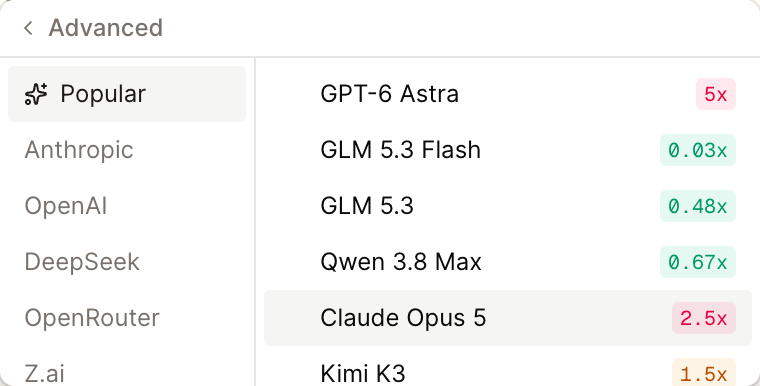
How to use it. Open the model picker in the composer → Advanced → it's at the top of Popular (also under OpenAI), showing at 5x. It reads images, and the Effort control offers Low, Medium, High and Max — Astra has no "off" setting, so it always reasons a little before it answers, and it also declines a few of the sampling knobs older models accept, which Conol handles for you. Like the other 5x models it's available on paid plans.
Tip
Astra's Max effort thinks for a long time. For everyday questions, Low or Medium answers in a few seconds; save Max for the problems that deserve it.
Agent edits no longer vanish from an open note
Why. This was the bug that started the release. If you had a note open in the editor while the agent edited it, the edit would arrive on screen, the chat would say it succeeded, and then — the next time your editor synced, sometimes seconds later, sometimes minutes — the note would snap back to its earlier state. From the chat's point of view nothing had gone wrong, so the agent would keep "fixing" the same passage and the user would keep watching it un-fix itself.
Underneath, the agent's edit and your editor were writing two different versions of the note's change history. Each agent edit produced one version for the live editor and a separate one for storage. They looked identical, but they weren't the same history, so the next edit could reference a version your editor had never seen. That edit was silently set aside, and your editor's next save overwrote it. The collaboration server running on two machines made it worse: an edit could land on the machine that didn't have your document open and get merged in from the side.
What changed. There is now exactly one history. The agent applies its change directly to the same document your editor holds, stores precisely what it sent, and the collaboration server reports back whether the change actually went in — and repairs itself from stored state if it didn't. We rebuilt the failing session from the original data and replayed every one of its writes against the fix: nothing is lost.
How to use it. Nothing to do. Keep your note open while the agent works — that's the case that used to break, and it's the case we test now. You'll see the agent's change appear in place, and anything you type afterwards sits alongside it.
Agent edits land more often, and only touch what they change
Why. An agent edit is a find-and-replace: the agent quotes the passage it wants to change and supplies the new text. Two things made that fragile. First, the agent saw notes through a layer of escaping that made line breaks and quotation marks look different from how they are in the note, and it copied that look back into its edits — which is exactly how the session above got a wall of literal \n in the middle of a paragraph. Second, the match had to be character-perfect: a lost space, a doubled space, or table padding that differed from the agent's copy failed the edit outright. Across two weeks of production use, roughly one edit attempt in six failed that way.
What changed. The agent now reads notes as plain text, the way it reads files, so what it copies is what the note contains. When an edit doesn't match exactly, Conol tries the obvious relaxations — undoing escaped line breaks and quotes, then ignoring whitespace and table padding — while still replacing only the original span. When nothing matches, the error tells the agent how far its quote matched and what the note says at the point where it diverges, so its retry is informed instead of blind. Text that looks escaped is refused before it can reach the note. And after a successful edit, the agent sees just the edited region with a few lines of context rather than the whole note, which keeps long sessions sharp.
Edits are also surgical now. A change to one paragraph used to rewrite every block of the note behind the scenes, even though the result looked the same. It now changes only the block it targets. That's what makes the fix above hold under real use: if you're typing in another paragraph at the moment the agent edits, both changes survive.
How to use it. Ask for edits the way you always have — "change the deadline in the second section to Friday", "replace the intro paragraph with…". You'll notice fewer "couldn't find that text" replies, and the ones you do see will say where the mismatch is. In the chat, expand the tool calls on an agent message to see the note it read and a red/green diff of exactly what it changed.
Cancel a timer from any chat
Why. The agent can set a reminder or a recurring check ("look at my inbox every two hours") and it keeps firing until cancelled. But the tool that cancels a timer could only see timers created in the same chat. Ask from a different chat — or from Telegram, where you can't pick a chat at all — and the agent would confidently report the timer cancelled while it kept running. Deleting the chat didn't help either: the timer lived on headlessly, and once its chat was gone it no longer showed in Settings, so there was no way to stop it.
What changed. The agent can now list and cancel every timer you own from any chat or channel, and it checks that a timer really exists before it claims to have cancelled it. Settings → Timers lists timers from deleted chats too. Deleting a chat now shuts down everything behind it — its timers, its running agent, its access key — so a deleted chat can't keep working, or billing, in the background.
How to use it. From any chat or channel, ask "what timers do I have running?" and then "cancel the inbox check". Or open Settings → Timers and remove one from the list. If a chat's only timer is removed, the chat stops showing as scheduled in the sidebar.
GPT-5.6 Sol costs a third less
Why. OpenAI lowered Sol's price on August 21, and we pass provider prices straight through.
How to use it. Nothing changes in how you pick it. Sol now shows at 2x in the picker instead of 2.9x, and everything you run on it is billed at the new rate.
Fixes
- Chats no longer name themselves after a reply — for a very short chat, the model that writes sidebar titles could answer the conversation instead of naming it, and a full sentence of reply became the title. Titles are now checked for shape; a chat keeps its plain label rather than a stray answer.
- Tool cards show the note, not the envelope — the expanded ReadNote card in a chat now renders the note body directly instead of a raw block with bookkeeping fields at the top.
← Back to blog