Conol 0.51.0 — All your accounts, one browser
Conol
- release-notes
Two themes this time. The first is about keeping things apart: several accounts in one browser without them bleeding into each other. The second is about keeping things intact — a long, careful pass over what happens to a note when your agent edits one small piece of it.
Stay signed in to several accounts at once
Why. If you had a work account and a personal one, you had a choice between signing out and back in all day or living in an incognito window. Neither is a real answer: the first loses your place constantly, the second loses everything the moment you close it. And the usual quick fix — a global "current account" — is worse than it sounds, because the moment you switch in one tab, every other open tab silently changes identity underneath you. A note you were mid-sentence in would save to the wrong place.
How to use it. Open the account menu at the top of the sidebar and choose Add account. You'll sign in as normal, and afterwards both accounts are listed in that menu with the active one marked. Switching is one click.
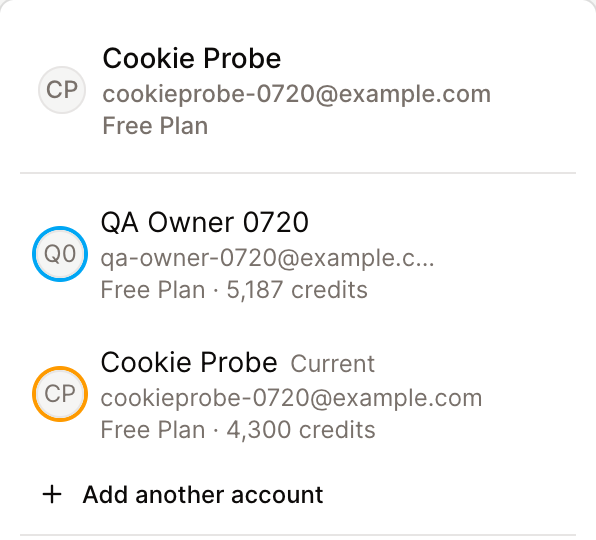
The important part is what happens to your other tabs: nothing. Each tab stays pinned to the account it was opened in. Open your work workspace in one tab, switch the second tab to your personal account, and both keep working — you can have them side by side on the same screen, and neither one will quietly become the other. If you want a tab in a specific account, switch it there and it stays.
Removing an account from the menu signs that one out and leaves the rest alone.
Tip
Every page in the app now lives under a per-account address, so a bookmark or a link you paste to yourself will reopen in the account it came from rather than whichever one happened to be active.
Bring your agent into a Slack channel
Why. Slack support was direct-messages only. That covered "ask the agent something privately", but not the thing teams actually wanted — the agent sitting in the channel where the work is being discussed, with the context of what everyone has been saying. A bot @-mention in a channel simply went nowhere.
How to use it. Invite the Conol bot to a channel the way you'd invite anyone, then mention it: @Conol summarise what we decided about the migration. Three things are worth knowing about how it behaves:
- It reads everything, but only speaks when mentioned. The whole channel conversation becomes context, so the agent answers with the room in mind rather than just your one line. It won't interject on its own.
- Everyone shares one conversation. A colleague's follow-up mention continues the same thread rather than starting from scratch, so you can hand off mid-task.
- Only bound members can trigger it. If someone who hasn't linked their Slack account mentions the bot, it points them to a DM to get set up — once a day, so it never becomes noise.
To link your account, send the bot bind in a direct message. In a channel, use @Conol bind or the /bind command.
Qwen 3.8 Max joins the model list
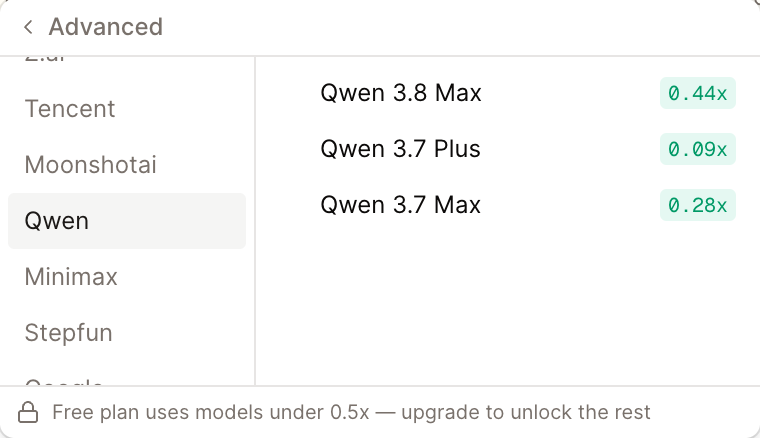
Why. Qwen 3.8 Max is Alibaba's new flagship — a 2.4-trillion-parameter mixture-of-experts model that lands near the top of the field on coding and reasoning, with a million-token context window and image and video input. It's a genuinely different option to have available when a task is large or visual.
How to use it. Open the model menu in any chat and pick Qwen 3.8 Max. It supports reasoning, so the Effort control applies to it as well. Because it takes video as input, it's a good pick for asking about a screen recording; because of the million-token window, it's a good pick for pointing at a large set of notes at once.
Your agent's edits leave the rest of the note alone
Why. This is the biggest piece of work in the release, and it fixes a class of problem that is genuinely hard to notice: you ask the agent to change one thing, it says it's done, and something else in the note quietly changed too — or your edit didn't land at all and nothing said so.
The cause was how an agent edit was applied. The note was converted to markdown, compared, and rebuilt — and anything markdown can't fully express got flattened on the way through. Concretely, all of these were happening:
- Edits to tables, math, nested list items and block properties were silently dropped — the agent reported success and the note was unchanged.
- Editing one part of a note rewrote parts nobody touched. Change a table cell and a neighbouring cell whose text was literally
仅**61%**完成came back with the asterisks eaten. Change a link's URL and the coloured text beside it lost its colour. - Attachments turned into plain links, empty media placeholders were swept away, blank lines were deleted, and a line break inside a block doubled on every edit.
- When the edit machinery crashed, it returned "no changes" — indistinguishable from a successful no-op. You'd get a success response and an unchanged note.
How to use it. There's nothing to turn on. Ask the agent to edit any part of a note and only that part changes: the untouched blocks are now carried over exactly as they were, ids and inline formatting intact, rather than being regenerated from a lossy round-trip. Tables, formulas, colours, attachments and blank lines elsewhere in the note survive. And an edit that genuinely fails now reports the failure instead of looking like "nothing needed doing".
If you've been avoiding asking the agent to touch notes with tables or equations in them, this is the release to try again.
Long notes open without the wait
Why. Opening a large note stalled for a beat before you could read it. Two things were happening on the critical path that didn't need to be: the word count was tallied over the whole document before the first paint, and every note linked to the one you were opening was fetched in full — entire rows, content and all — when only titles were needed to draw the list.
How to use it. Nothing to do; open a big note and it's there. The word count still appears, just a moment later, without holding up the text.
Nothing destructive happens on a single click
Why. Two menu items ran immediately on click while every other destructive action in the product asks first — and that consistency is exactly why nobody noticed. Delete chat sits one row under Rename in a three-item menu, so a slip removed a conversation with no confirmation and no visible way back. Remove member revokes someone else's access to every note in a workspace, one row under "Make viewer".
Separately, three chat actions — rename, pin, delete — fired their request and never checked the answer. When one failed, you got no error and the row snapped back to its old value, which reads as "the app ignored me".
How to use it. Both destructive items now open a confirmation dialog. The three chat actions now tell you when something failed and why. And New note can no longer fire twice: on a slow connection, clicking again because nothing seemed to happen used to create two notes — the button now disables itself with a spinner while the first one is on its way.
The cookie banner and its preferences dialog are also translated now, in all four languages.
Fixes
- Notes that refused to open — several more ways a note could end up unopenable are closed off, including at the collaboration-snapshot layer where a bad block id could previously slip through.
- Reordering reached outside its workspace — dragging notes to reorder them, and the agent's reorder tool, keyed their write on the note id alone. Both now write strictly inside the workspace the request was made for, and the response no longer carries note content back.
- A workspace viewer could write workspace memory — read-only members could edit shared agent memory. They can't now.
- Tool arguments in the wrong spelling — if the model sent
workspaceIdwhere the tool expectedworkspace_id, the call failed with a confusing scope error. Argument names now match regardless of case or separators. - Tall dialogs and popovers — a dialog or popover taller than the window pushed its buttons off-screen where they couldn't be reached. Both now stay within the viewport and scroll internally.
- Find and replace mangled
$patterns in inline note edits, and rebuilt the whole note when the replacement changed nothing. - Mention tags leaked raw XML in chat when a note or workspace had an unusual label.
- Onboarding prompts dropped into the composer are now translated rather than always English.
- Channel sessions from Slack, Telegram, WhatsApp and Discord now respect your plan's model and tool entitlements the same way the web app does.
- Analytics from non-production builds no longer fall back into the production property.
← Back to blog