Conol 0.49.0 — Claude Opus 5 arrives
Conol
- release-notes
This release is mostly about clarity: a stronger model to reach for, a clearer picture of what your plan includes, and a handful of media bugs in notes and chat that stopped being quietly annoying and started being fixed.
Claude Opus 5 — the new flagship
Why. Anthropic shipped a new top-tier Opus, and on the kind of work Conol agents actually do — long multi-step runs, code, deep reasoning across a big context — it's a clear step up from Opus 4.8. It lands at the same price per token as 4.8, so there's no reason to keep reaching for the older model on hard problems.
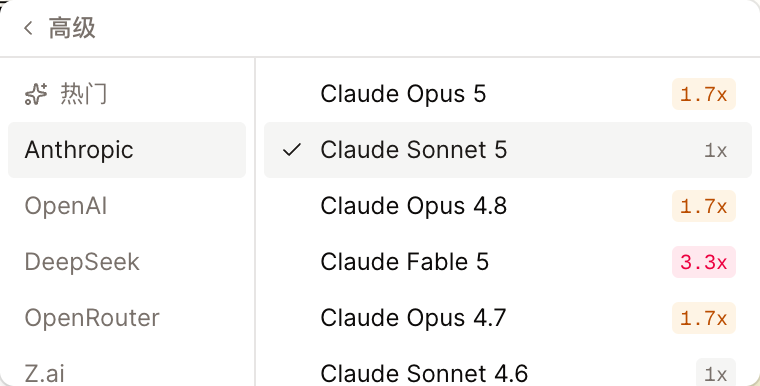
How to use it. Open the model picker in the composer, choose Advanced → Anthropic, and pick Claude Opus 5. It sits at the top of the Anthropic list with a 1.7x cost badge, supports the full thinking-effort range (from low all the way to xhigh), and handles text and images. If you want it as your default for every new chat, set it in Settings → Default model.
Tip
For most everyday work, Sonnet 5 is still the sweet spot on speed and cost. Reach for Opus 5 when the task is genuinely hard — a large refactor, a long research run, a problem you'd want to think carefully about.
Join the Conol community on Discord
Why. We've been hearing from people one at a time — support emails, DMs, occasional bug reports. That's a poor substitute for a room where users can see what each other are building and get answers from people who've already solved the same problem.
How to use it. There's now an official Conol Discord. You'll find the invite as a button on the landing page and in the app footer. Come share what you've built, ask for help, or tell us what's missing — the team reads it.
The model picker now shows your plan honestly
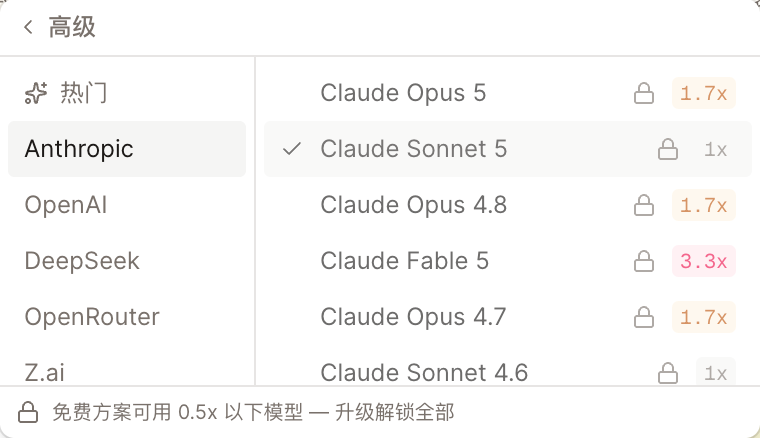
Why. This one was a real papercut, and it was our fault. Premium models require a subscription or a credit purchase, and if you were on the free plan and picked one anyway, we would quietly run a cheaper model instead — while the picker kept showing the model you'd chosen. You had no way of knowing. Worse, the default pick was itself a premium model, so every free chat was silently substituted.
How to use it. Nothing to do — the picker now just tells the truth. On the free plan, premium models appear locked with a lock icon and their cost badge, and tapping one takes you straight to billing instead of silently switching your chat. A line at the bottom of the picker spells out the rule: the free plan covers models under 0.5x. And in the rare case a substitution still happens — a lapsed subscription, an old browser tab — you get a notice naming the model that actually ran.
Pasted images never break again
Why. Copying an image from a web page and pasting it into a note used to produce a link back to the original site rather than a real copy. That works right up until the other site blocks hotlinking, moves the file, or takes it down — and then your note has a broken image in it, sometimes weeks later, with nothing you can do about it.
How to use it. Just paste as usual. Conol now fetches the image and saves its own copy automatically, then points the note at that copy. The image keeps loading no matter what happens to the original page, and everyone you share the note with sees it too. Pasting a screenshot or a local file worked before and still does.
Fixes
- Unplayable videos are caught at upload — video files in a format browsers can't decode (a common export setting on camera and detection software) used to insert a player stuck at 0:00 with no explanation. You now get a clear message asking for H.264 MP4 instead of a dead player.
- Selecting across an image highlights it — dragging a selection over a picture used to highlight the text around it and leave the image looking untouched, so you couldn't tell whether it was included. Images, video, audio, and file blocks now highlight along with the text.
- Chat attachments zoom on click — images you attach to a message can now be clicked open in the full viewer before you send, so you can check you attached the right thing.
- The video embed panel asks for the right thing — its URL field said "enter image address" in Chinese; it now asks for a link, in every language.
- Agent edits keep your text colors — when the agent rewrote a paragraph you had colored or highlighted, your formatting was reset to plain text. Colors and highlights now survive the edit.
- Sharing a note points you to the right place — the "connect a channel" row in the share menu now takes you straight to the channels section of settings.
- Stability — timers can no longer wedge an agent session with repeated work, and the collaboration server no longer drops the whole fleet on a malformed request.
← Back to blog