Conol 0.48.1 — Your chats, organized
Conol
- release-notes
The chat list is the map of your work in Conol — but as it grows, the sessions you actually return to every day get buried under everything you've ever started. This release is about putting you back in charge of that list: pin the chats that matter, give any chat a name that sticks, and let the quick one-off chats name themselves instead of all reading "Home chat."
Pin the chats you keep coming back to
Why. The session list is ordered by time, which is great for "what did I do yesterday" and terrible for "open the chat I use every morning." A standing research thread, a recurring scheduled agent, the workspace you live in — they all drift down the list the moment you touch something newer, and you end up scrolling or starting over.
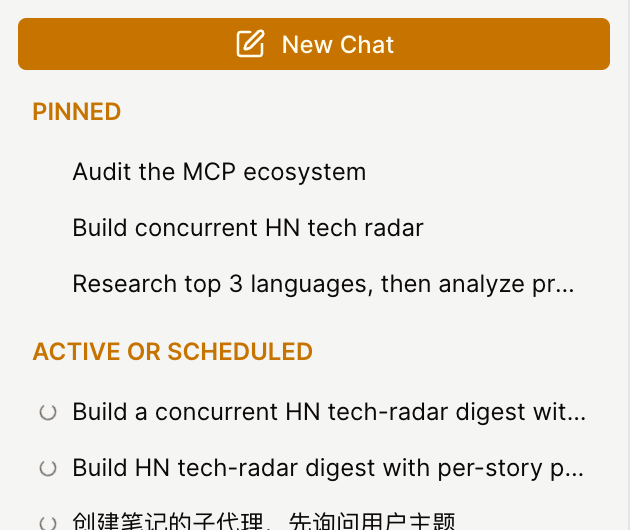
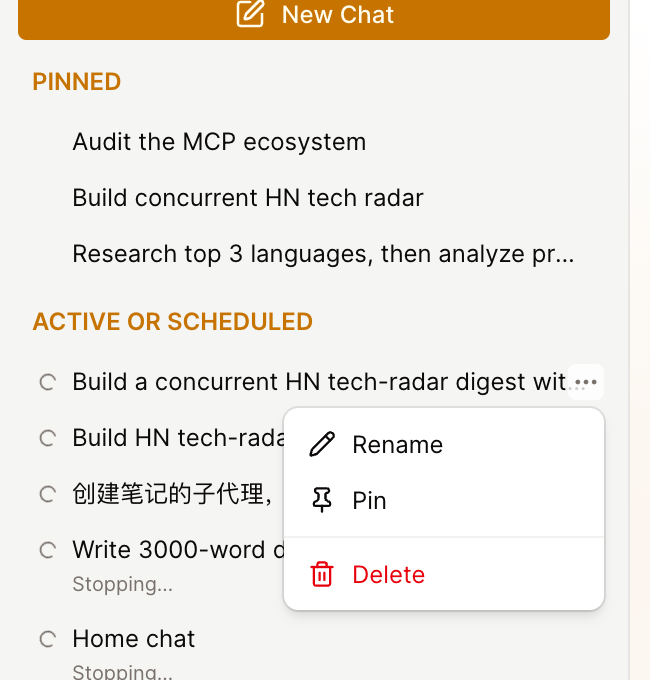
How to use it. Hover any chat in the sidebar and click the ⋯ menu on the right, then choose Pin. The chat jumps into a new Pinned group that sits at the very top of the list and stays there — above Active, above today, above everything — no matter how many new chats you start. Pin as many as you like; unpin the same way when a chat has run its course. Pinned chats stay put even while you filter the list by date, so your shortcuts are always one click away.
Give any chat your own title
Why. Conol titles a chat from the agent's intention — the one-line summary it sets for the task it's doing. That's usually helpful, but it's the agent's words, not yours, and it can shift as the conversation moves on. If you wanted a session to just be called "Q3 planning," there was no way to say so and make it stick.
How to use it. Open the same ⋯ menu and choose Rename, then type the title you want and press Enter. From then on that's the chat's name — and the agent will never overwrite a title you set, even if it updates its intention later. Changed your mind? Rename it again, or clear the field entirely to hand naming back to the agent. Your custom title shows everywhere the chat appears: the sidebar, search, the chat header, and your recent-chats list.
Tip
The title you set lives separately from the agent's intention, so the two can never fight. Clearing your title simply reveals the agent's intention again underneath.
Quick chats name themselves
Why. Not every chat is a big task with a declared plan. Plenty are quick questions — "what's the difference between these two APIs," "help me word this." Those never set an intention, so they all showed up in the list as a generic "Home chat" or "Note chat," indistinguishable from one another.
How it works. Now, when a short chat wraps up its first exchange without ever setting a topic, a lightweight model reads what you and the agent just said and writes a short, recognizable title for it — automatically, in the background, in whatever language the conversation used. You don't have to do anything, and if you'd rather name it yourself, your rename always wins.
Sign-up is better shielded from bots
Why. Open sign-up is a magnet for automated abuse — scripted account creation, throwaway registrations, the usual. We wanted to raise that bar without making real people jump through hoops.
What changed. Creating an account now runs an invisible reCAPTCHA check behind the scenes. It scores each attempt silently; genuine sign-ups sail straight through with no puzzle, no checkbox, no extra step, while automated ones get stopped. If you're a real person, you'll never notice it's there.
Fixes
- Notes hidden by a broken parent link are recoverable again — in rare cases a note could end up pointing back at itself through its parent chain and quietly vanish from the tree, taking its children with it. A repair pass now detects those loops and restores the affected notes to view, so nothing stays lost.
← Back to blog