Conol 0.48.0 — The island comes alive
Conol
- release-notes
Last release gave Conol a new front door: a live voxel island where robot agents pick up jobs and work them in real time. This release makes that island yours to play with — and applies the same "it should just work" energy to the everyday stuff: the Flash tier now actually streams fast, the agent's task checklist stops playing hide-and-seek, and a file named 会议纪要.pdf arrives with its name intact.
A hidden playground on the landing page
Why. The voxel island was built to show what Conol does — agents picking up jobs, working them, filing results — but it was watch-only. The most common thing people did on the landing page was try to click it anyway. Now the island rewards that curiosity: there's a full hidden world for anyone who finds the way in.
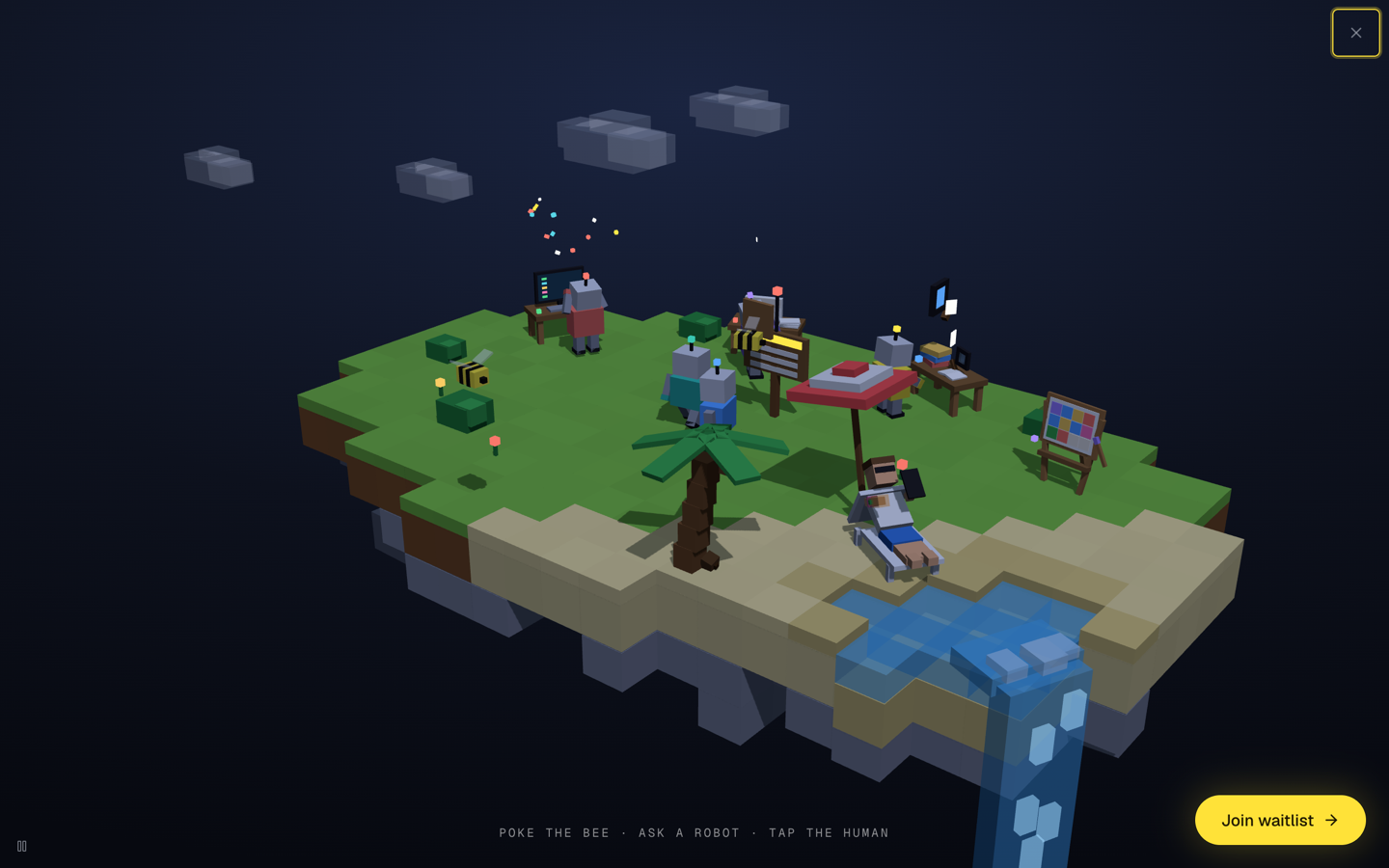
How to find it. Visit conol.ai and look at the island: a person is lounging on the beach, phone in hand, screen glowing. Click the phone (your cursor turns into a pointer over it). The lights come up, the island rises to center stage, the page chrome flies out, and the scene takes over the whole screen — with a hint line at the bottom: Poke the bee · ask a robot · tap the human.
Everything on the island is now clickable:
- The bees (there are two now) have Minecraft-style hearts. Each poke flashes a hit, knocks one heart off; three hits knock a bee out of the sky. It lies dazed on the sand, recovers, and buzzes off with a full heart bar.
- The robots answer for themselves. Click a busy one and it pauses, turns to face you, waves, and names its job — "Shipping a code job!", "On inbox duty!", "Deep in research!". Click a lounging one and it marches to a free desk and gets to work.
- The palm tree shakes a coconut loose when you click it — it bounces on the sand, fades away, and quietly regrows on the branch.
- The lagoon erupts in a crown of foam when clicked, flinging water at the beach-goer — who sputters awake if they were napping.
- The human toggles between playing on their phone and sleeping under floating voxel Z's.
Press Esc or the X in the corner to shrink everything back into the page. It all works on touch screens too, and it's localized in all four languages Conol speaks.
A livelier island, no clicks needed
Why. Even for visitors who never find the easter egg, the island should feel alive — it's a simulation, not a screenshot.
What's new. Four ambient touches, all visible on the normal landing page without doing anything: a waterfall now pours off the lagoon's rim over the island's edge (with falling water chunks and mist), a second smaller bee patrols a tighter, faster orbit than the mascot bee, the palm grew a cluster of coconuts, and the email station's envelope flaps open with a letter rising out of it — eagerly when a robot is on mail duty, lazily when the station is idle.
Flash is actually fast now
Why. The Flash tier exists to be superfast and cheap — but some sessions crawled at a dozen tokens per second. The cause: Conol expressed no routing preference to OpenRouter, whose default load-balancing is price-weighted, so a session could land on a very slow host and stay there. Worse, hopping between hosts meant the provider's prompt cache never warmed up.
What changed. Conol now tells OpenRouter to sort candidate hosts by throughput for its multi-host open models, so Flash streams at the fastest available host's speed — and sticking to a fast host lets the provider-side prefix cache start hitting across turns, which cuts latency further. A hard price cap rides along with the routing preference, so a fast-but-overpriced host can never be selected: Conol never pays an upstream more per token than the rate you're billed.
One honest note: Flash's billed rate moved from the catalog floor ($0.09/$0.18 per million tokens in/out) to the fast tier's actual rate ($0.14/$0.28, with cache reads at $0.028) — you're paying the fast-host price and now you reliably get the fast host. Flash remains by far the cheapest tier, and nothing changes in how you use it: pick Flash in the model menu and the routing is automatic.
Task checklists now belong to their turn
Why. When the agent plans a multi-step task, a slim checklist strip appears above the composer with a progress ring. It had two annoying habits: the moment the last box was ticked the whole strip vanished — so you never saw the finished list — and old plans could leak across turns, resurfacing later looking "stuck" on some long-done task.
How it works now. The checklist is scoped to the turn that created it. When a turn finishes with everything done, the completed list stays visible — "All tasks done" — as a record of what that turn did. When you send your next message, the old plan clears. A turn that ends with unchecked items no longer leaves its stale checklist behind, and reloading the page no longer resurrects a finished plan. Hover the strip any time to see the full checklist.
Fixes
- Files with Chinese or Japanese names deliver correctly — asking the agent to collect or generate a file with a non-Latin name (会议纪要.pdf, 議事録.pdf…) used to fail before the upload even started. Filenames now survive the trip intact, for collected files, generated documents, and screenshots alike.
- Empty searches no longer trip the agent — a sandbox file search that matched nothing surfaced as "Tool execute error: exit status 1", which the agent would retry in a loop, wasting minutes of your session. No-match searches now return cleanly. The same bug class was swept out of the desktop and browser tools, which also now report real error details when something genuinely fails instead of a bare exit code.
- Renaming a note no longer flickers the sidebar — every keystroke in a note's title used to refetch every expanded level of the note tree. Now the sidebar updates just that note's row, live, with zero refetches.
- Cleaner scroll fades in the sidebar — sidebar lists used to paint a gray gradient over their scroll edges, which never quite matched the background (and clashed badly with the desktop app's translucent sidebar). The rows themselves now dissolve to transparent, so the fade looks right on any background.
Under the hood
The whole workspace moved to Next.js 16.3.0-preview.7, and the new throughput routing shipped with a per-model cost audit so the price cap is applied exactly where it's safe — models with a single host or their own long-context pricing tiers keep their default routing.
← Back to blog