Conol 0.41.0 — Meet GPT-5.6, and sharper voice input
Conol
- release-notes
This release is about choice and clarity: three brand-new OpenAI models to pick from — including a new flagship — and a voice input that understands more of what you actually say. Plus a round of fixes that keep workspaces tidy and honest.
GPT-5.6 Sol, Terra & Luna
Why. OpenAI released the GPT-5.6 family on July 9, and it's a real step up: a one-million-token context window, image understanding, and reasoning across all three tiers. Different jobs want different trade-offs — sometimes you want the smartest possible answer, sometimes you want ten quick ones — so we brought in the whole family rather than just the flagship.
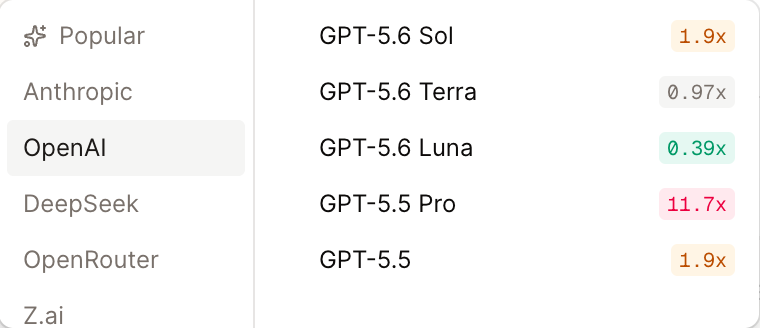
How to use it. Open the model picker at the bottom of any chat — the three new models are under OpenAI (Sol is also in Popular):
- GPT-5.6 Sol — the flagship, for the hardest problems: deep research, long agentic runs, gnarly code. 1.9× credits.
- GPT-5.6 Terra — the balanced tier for everyday work, at roughly the same credit rate as Claude Sonnet 5 (0.97×).
- GPT-5.6 Luna — fast and light, great for quick questions, summaries and high-volume tasks, at about a third of the baseline rate (0.39×).
You can switch models mid-conversation too — pick a cheap model to explore, then hand the hard part to Sol without starting over.
Voice input hears you better
Why. Voice is the fastest way to brief your agent — but only if the transcript matches what you said. Our previous speech model struggled with exactly the speech patterns many of you use every day: Chinese, regional dialects, and sentences that switch languages midway. We've moved transcription to Qwen3-ASR Flash, a new speech model that benchmarks notably better on all three.
How to use it. Nothing to set up — it's already live everywhere you talk to Conol:
- the mic button in the chat composer, and
- voice messages you send to your agent on Telegram.
Just speak naturally; mixing languages mid-sentence is fine.
Fixes
- No more twin workspaces — creating or renaming a workspace now rejects a name you already use (case-insensitive), so two identical entries can't sneak into your sidebar.
- Deleted workspaces stay deleted — notes in a deleted workspace could still be opened and edited through an old link. Those links now show a proper no-access screen.
- Agent questions stay on screen — a long free-text answer no longer grows the agent's question form past the bottom of the screen; the answer box scrolls instead, keeping Submit within reach.
← Back to blog