Conol 0.39.0 — Now in your language
Conol
- release-notes
This release opens Conol up to a lot more people: the entire app and marketing site now read in Japanese, Simplified Chinese, and Traditional Chinese, alongside English. Around that headline we also reworked the inbox so it never acts before you've read it, added Veo 3.1 video generation to the Gen tool, taught agents to use all of your memory, and smoothed out a batch of composer and reliability rough edges.
Conol in Japanese, Simplified & Traditional Chinese
Why. Conol has been English-only, which quietly shut out anyone who'd rather work in their own language — and made the product feel foreign before you'd even started. Agents already understand and reply in whatever language you write to them; the interface was the part that hadn't caught up.
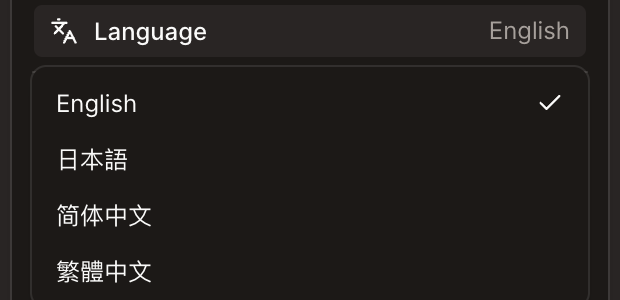
How to use it. Pick your language and everything follows — menus, settings, the composer, the landing page, and even these release notes. There are three places to switch:
- Inside the app: open your account menu (your avatar at the bottom of the sidebar) and use the Language row, right under the theme toggle.
- Signed-out pages: the login, sign-up, password-reset, and maintenance screens have a globe switcher in the top-right corner.
- The landing page: a globe in the top nav.
Your choice is remembered and follows you across devices, so you set it once. The four languages available today are English, 日本語, 简体中文, and 繁體中文.
Tip
Working in a language we don't cover yet? Tell us — the framework is in place, so adding a language is now mostly translation.
An inbox you can read before it acts
Why. The inbox is where your agents reach you — a task finished, a question needs answering, something needs your sign-off. But opening a notification used to run its action immediately and dismiss the message, with no chance to read the full text first. Worse, the list only showed pending items, so once you'd handled something it vanished with no history to look back on.
How to use it. The inbox now respects a simple rule: reading is separate from acting.
- Tap a message to expand it and read the full body. A chevron marks the ones that have more to show. Tapping never runs an action or dismisses anything.
- Every action is its own labeled button, so you choose deliberately instead of triggering something by opening the message.
- An Unread / All toggle switches between what's still pending and your full history — including notifications you've already handled or that have expired.
Generate video with Veo 3.1
Why. The Gen tool could already make images, music, and audio, but video was the missing piece for anyone putting together a teaser, a demo clip, or a bit of motion for a note.
How to use it. Ask an agent to generate a video and it can now use Google's Veo 3.1 model — a product teaser, an animated concept, a moody bit of b-roll. The result comes back as a real video you can play inline and drop straight into a note, the same way generated images already work.
Agents draw on all of your memory
Why. Memory is how you teach an agent your preferences, your rules, and the context of a workspace so you don't repeat yourself every session. But the agent was only being handed a fixed handful of files — your global profile, rules, and a single workspace context file — while anything else you'd written was left out. Some workspace memory wasn't being loaded at all.
How to use it. Nothing changes in how you write memory — it just counts for more now. Your agent reads every memory file in scope: your global profile and rules, plus each in-scope workspace's notes, not just the ones it happened to look for by name. Large files are trimmed with a pointer to the full version rather than dropped, and anything beyond the budget is listed so the agent can pull it up on demand. If you'd written workspace memory before and it didn't seem to stick, this is why — it comes through now.
Timers you can actually read
Why. Scheduled and repeating timers were shown as raw cron expressions like 0 9 * * 1-5. Technically accurate, but you shouldn't have to decode a cron string to know when your agent is going to run.
How to use it. Timers now read in plain language — "every weekday at 9:00 AM" instead of 0 9 * * 1-5 — wherever they're listed, so the next run is obvious at a glance. Nothing to configure; existing timers just read better.
Fixes
- The model picker fits on mobile — the model selector's dropdown could run past the edge of a phone screen and clip the price badges on the right. It now stays within the viewport on any width.
- A character cap and counter on long messages — very long composer input is now capped, with a live counter as you approach the limit, so a message can't grow past what a turn can take.
- Attachments are capped and stay out of the way — there's now a limit on how many files you can attach at once, and the attachment preview no longer covers the text you're typing.
- Blank and overlong names are rejected — note and agent titles now reject empty, whitespace-only, or excessively long names instead of saving them.
- A clear error when history won't load — if older chat history fails to load, you now see an error you can retry instead of a silent gap in the conversation.
- Cancelled turns don't disturb your timers — cancelling a turn no longer causes scheduled timers to fire late or drift off their schedule.
← Back to blog